Raghwendra Web Services (RWS) built B2B ecommerce with SAP integration for a German premium cigar importer and wholesaler. Three parts made up the project: an ordering portal, a REST API to the client's SAP ERP, and a public TYPO3 brand site. It went live in 2025.
The client's sales representatives look after business customers and distributors. SAP ERP, the business system that handled its orders, held the data the portal relied on. RWS, established in 2005, has delivered 650+ projects for clients in 20+ countries.
The brief
Orders at the client ran through its SAP ERP. Ordering in SAP was not practical for every customer and every sales representative. That led the client to ask for a simple online ordering system, connected to SAP, for both groups.
One decision came before any code: which system owned the data. The answer was SAP. Customer records, prices, rebate credit and promotions stayed there and reached the portal as data, which gave the build a single source of truth.
RWS worked in agile sprints. Each sprint began with a requirements discussion with the client and its SAP team. Wireframes with the client came before the build. Laravel and TYPO3 developers, a project lead and a tester made up the team. From the first sprint to go-live, including testing and debugging, the work took roughly three to four months. If you are planning a similar integration, contact us with a short description of your ERP and how orders reach it today.
ERP integration: how SAP and the shop exchange data
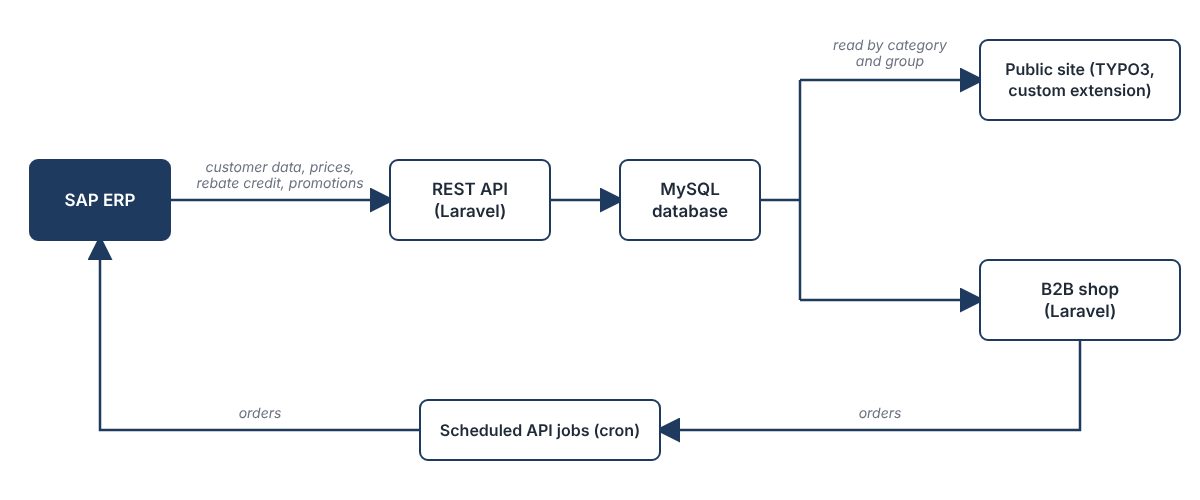
Business data had to travel from SAP to the shop, and orders had to travel back. RWS connected the two with a REST API built in Laravel. A REST API is a set of web addresses that one system can send data to, or ask for data from, in an agreed format.
From SAP to the shop
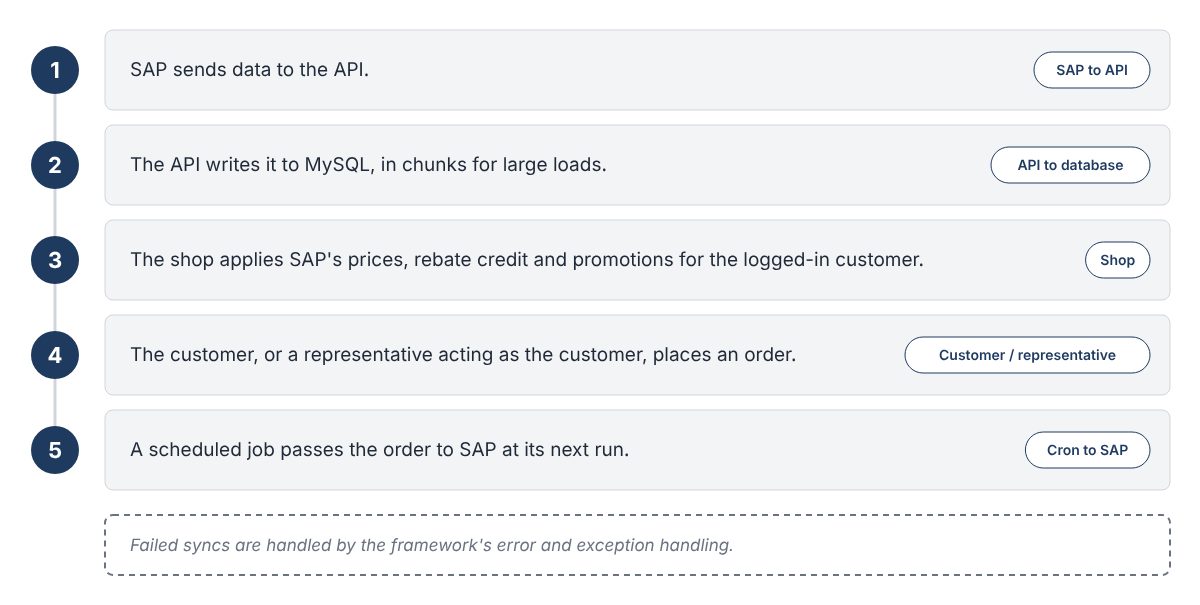
SAP's side called the API to send data, and the API wrote it into the shop's MySQL database. That data included the customer records used at registration and the results of SAP's pricing, rebate and promotion rules. The shop stored those results and applied them without recalculating.
Large loads went into the database in chunks, so a big data set arrived as a series of manageable batches. Laravel's error and exception handling covered failed syncs. Fields that came from SAP were read-only in the shop, which left one place to correct them: SAP.
From the shop to SAP
Orders placed in the shop went back to SAP through API jobs that ran on a schedule. Cron, a standard tool for running tasks at set times, triggered them. In this business, orders were infrequent and high in value, so a scheduled hand-off was enough. Nothing needed to post to SAP the moment a customer placed an order.
Design and testing
RWS designed the database in dbdiagram before the build. Its original design had 17 tables. They covered customers and their delivery addresses, representatives and their assigned customers, products and categories, and orders with their items and delivery status. Testing of the API endpoints ran in Postman.
Layer
Technology
Business system
SAP ERP
Integration
REST API built in Laravel
Shop
Laravel
Data store
MySQL
Public site
TYPO3 with a custom extension
Design and testing
dbdiagram, Postman
The B2B ordering portal for customers and distributors
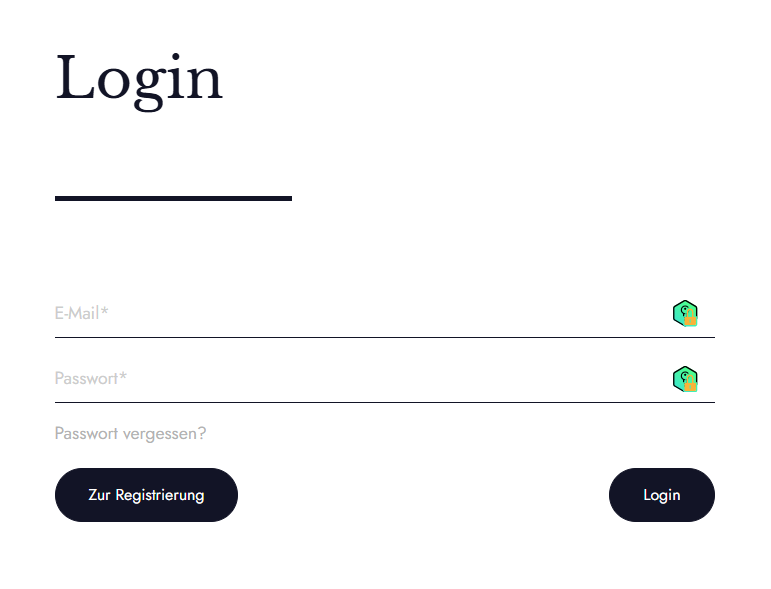
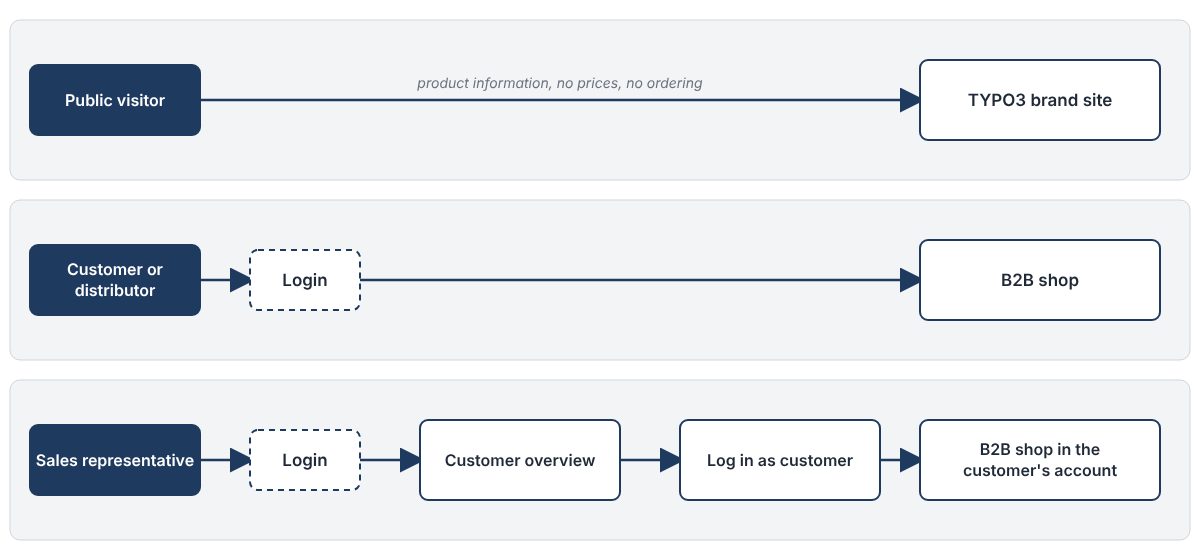
The portal was a closed shop. It had three kinds of user: public visitors to the brand site, customers and distributors who logged in to order, and representatives who ordered on their behalf. Only customers and representatives already known to SAP could register, and ordering and customer data sat behind login. RWS built the portal as a custom web application in Laravel, and the application ran on a server in Germany.
Registration from SAP records
Registration required an email address and a customer number that matched a record in SAP. SAP-supplied fields appeared pre-filled and read-only. Each customer gave one delivery address at registration, and customer service added any further ones.
Customer-specific catalogue and rules
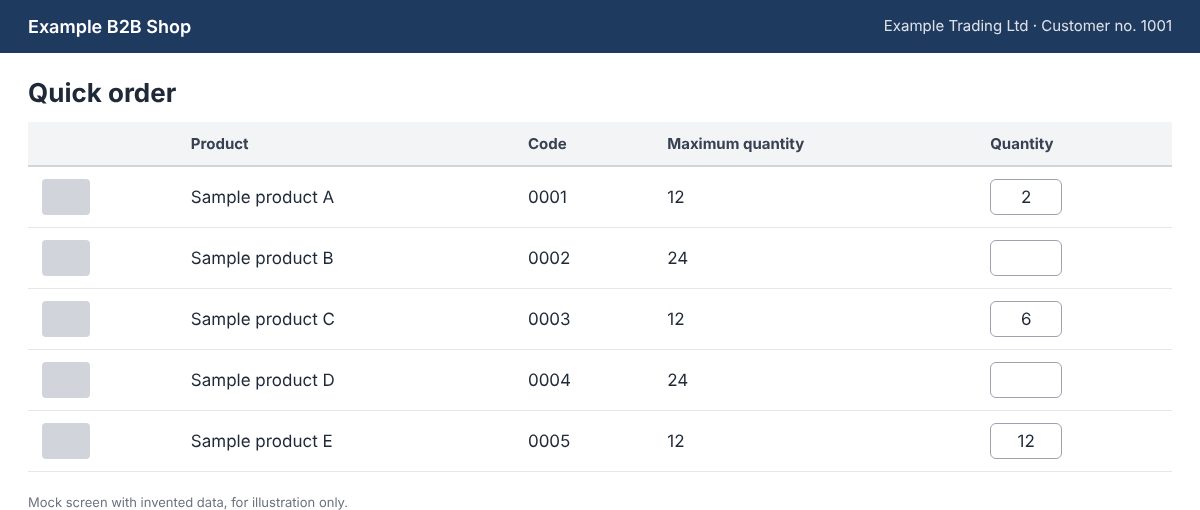
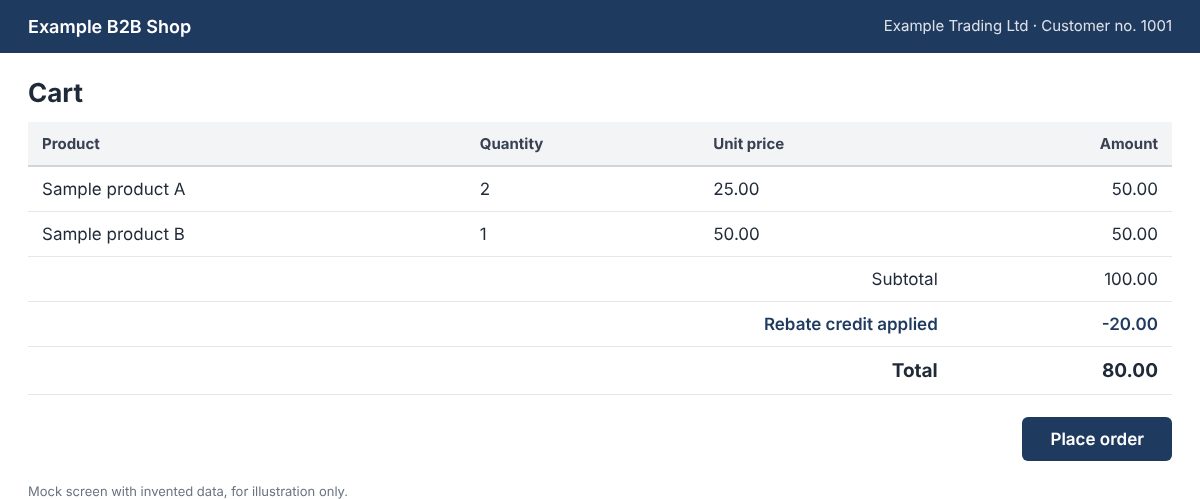
Every customer saw their own promotions, a quick-order list, favourites, recommendations and new products. Maximum quantities differed by customer, preorders were supported, and the shop suggested alternatives for unavailable items. The cart showed the customer's rebate credit (a credit balance) applied to the order.
SAP calculated these rules. Laravel middleware, the layer of code that sits between a request and the page, applied the results. That meant a change to a price or a promotion happened in SAP, not in the shop.
Orders, deliveries and invoices
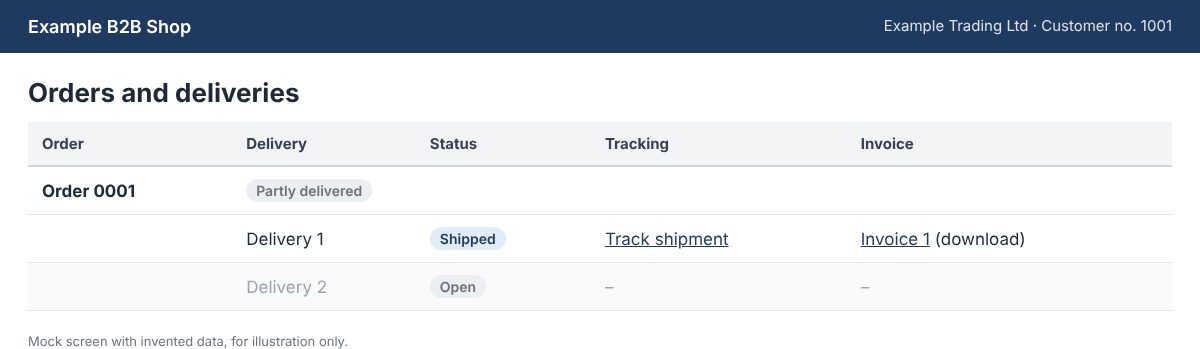
Order history sat beside open orders and subsequent deliveries, so a partly delivered order showed what had shipped and what was still to come. Each delivery had a status and a tracking link. Invoices and credit notes were available to download in the customer area, with one invoice per delivery. A documents area held further files.
Search and product filters
Search offered autocomplete, and a product finder sat beside category and brand navigation. Filters narrowed the catalogue by attributes such as origin, strength, flavour, price range, brand, series and format. We wrote up the approach in our guide to smart product filters for ecommerce.
Ordering on behalf of customers
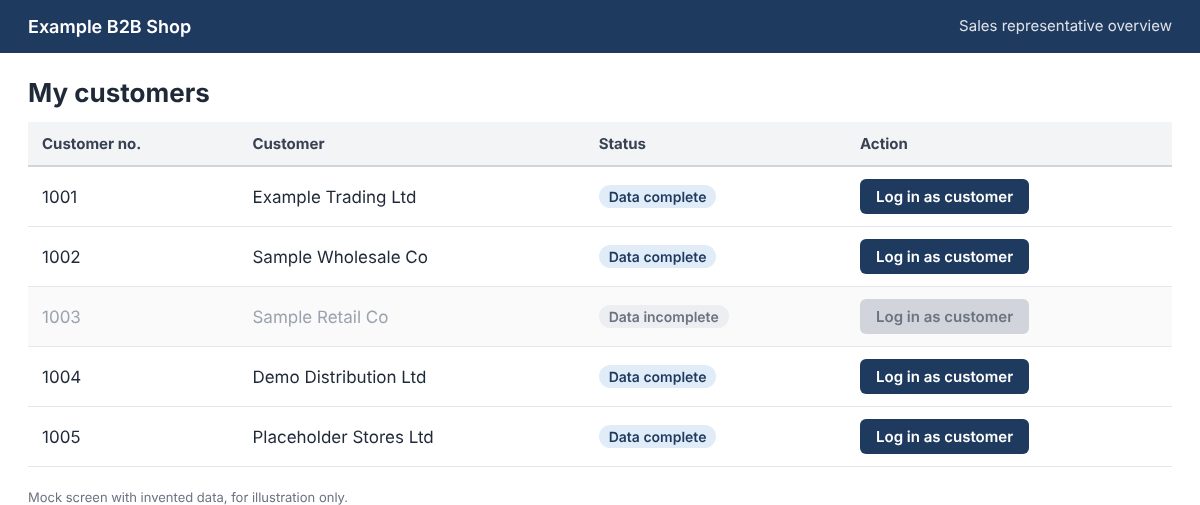
Each representative logged in to an overview of their assigned customers. From there, a representative could log in as any customer whose data was complete and place an order in that customer's account. Representatives also saw promotions meant for them alone. Because the work happened inside the customer's own account, the order followed that customer's catalogue and rules.
The public site on TYPO3
TYPO3 is a content management system, the software editors use to update pages. RWS handled the website development for the public site: a custom TYPO3 theme built to the client's design, set up in German as the default language, with an English version. Editors maintained brand and series content in TYPO3, and RWS integrated further TYPO3 extensions.
A custom extension connected the site to the shop's data. It read customer and product data from the MySQL database, selected by category and group. Public pages showed product information without prices or order buttons. Prices and ordering stayed behind login.
Decisions and trade-offs
Four choices shaped the build, and each had a reason and a cost.
SAP owned the data and the rules
SAP already held the customer data and calculated prices, rebate credit and promotions. Letting the portal store and apply the results avoided a second copy of that logic. The price was dependence: the portal could only show what SAP had last sent, and any correction to SAP-owned fields had to be made in SAP.
Orders went back on a schedule
Infrequent, high-value orders made a scheduled hand-off enough. What it cost was timing, because an order reached SAP at the next scheduled run, not at the moment it was placed.
Large loads went in as chunks
A big SAP data set was easier to handle as a series of batches than as one request. Loading code got more involved than a single bulk insert would have been.
TYPO3 for brand content, Laravel for ordering
Brand and series pages needed editor tools and a custom theme, while ordering needed application logic tied to SAP data. Both worked from one MySQL database. Two applications to maintain was the cost, along with a custom extension that had to stay in step with the shop's database.
The result
- The portal went live in 2025, and customers and representatives could order online without working in SAP.
- Orders reached SAP automatically through scheduled jobs.
- Representatives could place orders on behalf of the customers they looked after.
- SAP remained the source of truth for customer data, prices, rebate credit and promotions.
Frequently asked questions (FAQs)
{ "@context": "https://schema.org", "@type": "FAQPage", "mainEntity": [ { "@type": "Question", "name": "How did the portal connect to SAP?", "acceptedAnswer": { "@type": "Answer", "text": "Through a REST API that RWS built in Laravel. SAP's side called the API to send data, and the API wrote it into the shop's MySQL database. Orders travelled back to SAP through API jobs that ran on a schedule, triggered by cron." } }, { "@type": "Question", "name": "Did the portal calculate prices and rebates itself?", "acceptedAnswer": { "@type": "Answer", "text": "No. SAP calculated prices, rebate credit and promotions and sent the results as data. Laravel middleware applied them in the shop. A change to a price or a promotion therefore happened in SAP, not in the portal." } }, { "@type": "Question", "name": "How quickly did orders reach SAP?", "acceptedAnswer": { "@type": "Answer", "text": "At the next scheduled run of the API jobs, not at the moment of ordering. Orders in this business were infrequent and high in value, so a scheduled hand-off was enough. Cron, a standard tool for running tasks at set times, triggered the jobs." } }, { "@type": "Question", "name": "Could sales representatives order for their customers?", "acceptedAnswer": { "@type": "Answer", "text": "Yes. A representative logged in to an overview of assigned customers and could log in as any customer whose data was complete. The order went into that customer's own account. Representatives also saw promotions meant only for them." } }, { "@type": "Question", "name": "How long did the project take?", "acceptedAnswer": { "@type": "Answer", "text": "Roughly three to four months from the first sprint to go-live, including testing and debugging. RWS worked in agile sprints, and each began with a requirements discussion with the client and its SAP team. Laravel and TYPO3 developers, a project lead and a tester made up the team." } } ] }
How did the portal connect to SAP?
Through a REST API that RWS built in Laravel. SAP's side called the API to send data, and the API wrote it into the shop's MySQL database. Orders travelled back to SAP through API jobs that ran on a schedule, triggered by cron.
Did the portal calculate prices and rebates itself?
No. SAP calculated prices, rebate credit and promotions and sent the results as data. Laravel middleware applied them in the shop. A change to a price or a promotion therefore happened in SAP, not in the portal.
How quickly did orders reach SAP?
At the next scheduled run of the API jobs, not at the moment of ordering. Orders in this business were infrequent and high in value, so a scheduled hand-off was enough. Cron, a standard tool for running tasks at set times, triggered the jobs.
Could sales representatives order for their customers?
Yes. A representative logged in to an overview of assigned customers and could log in as any customer whose data was complete. The order went into that customer's own account. Representatives also saw promotions meant only for them.
How long did the project take?
Roughly three to four months from the first sprint to go-live, including testing and debugging. RWS worked in agile sprints, and each began with a requirements discussion with the client and its SAP team. Laravel and TYPO3 developers, a project lead and a tester made up the team.
