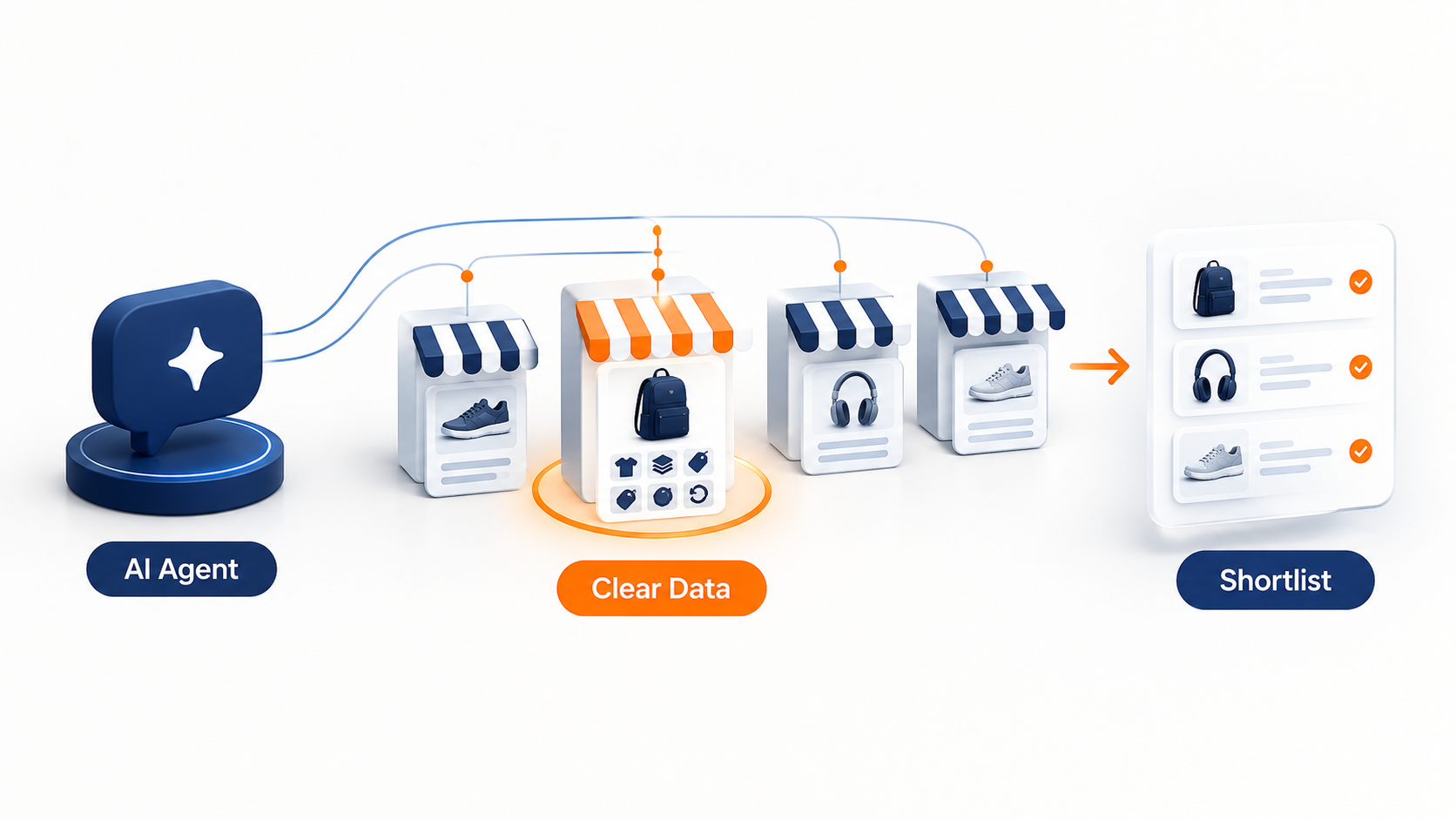
Your store is ready for agentic commerce when AI shopping agents can find your products, trust your data and complete a sale on your terms. The checklist below shows where you stand.
Before you start: some of these channels only work if you sell to customers in the United States. The “Does Your Store Qualify?” section explains which ones.
| # | Question owners ask | What the sources show | What to do instead |
|---|---|---|---|
| 1 | Is agentic commerce only for big brands? | Shopify’s Agentic plan is open to merchants on other platforms. Eligibility depends on your business and products, your customers’ location, your payment setup and the AI channel. | Check eligibility and your settings first |
| 2 | Do I have to build my own AI shopping agent? | In my view, for most stores the job is to be findable and buyable by agents that already exist | Focus on product data, policies and settings |
| 3 | Can only Shopify stores take part? | Shopify offers an Agentic plan for stores on other platforms, with no Shopify online store needed | Pick your route |
| 4 | Can I control how AI channels show my products? | Shopify’s help pages describe settings that switch off Catalog access or direct checkout, channel by channel | Review the settings and decide on purpose |
What Agentic Commerce Means in Plain English
Imagine a personal shopper who reads every product page, checks each returns policy and comes back with a short list. That’s the idea. An AI agent, meaning software that acts towards a goal rather than only answering questions, does that legwork for the shopper. Sometimes it also completes the purchase.
It differs from ordinary browsing, where a person types into a search box and clicks through shops one by one. It also differs from the chatbot on a single website, which answers questions about one store. An agent works across many stores at once.
For example, take a hypothetical shopper who asks an assistant for a waterproof walking jacket in women’s size 14, under a set budget, delivered within a week, with free returns. The assistant can only match stores that state those facts clearly. So a jacket with a vague size chart, no delivery estimate or a returns policy buried three pages deep is hard to match. This is an illustration, not a client story.
Two open standards sit underneath some of this. The Universal Commerce Protocol (UCP) is an open standard that Google and Shopify developed together. Stripe and OpenAI developed the Agentic Commerce Protocol (ACP). Each is an agreed rulebook for how an agent talks to a store. Most owners never work with them directly.
Why Store Owners Should Care
Buying can now begin inside an AI assistant instead of a search results page. If the assistant can’t read your products clearly, you may not make the shortlist. That’s an inference, not a measured result.
Keep the scale in proportion. Nobody can tell you how much of your sales will come through AI assistants, and any forecast is still a guess. But what the platforms have confirmed is narrower. Shopify has built selling routes into ChatGPT, Microsoft Copilot and Google’s AI Mode. Eligibility is a starting point, not a promise that your products will appear in a specific answer. In my view, each AI channel decides what to show.
So the opportunity is modest but real. Make your products easy to read and trust, and be ready if volumes grow. Some stores can reasonably do the basics and wait. A store that sells things people choose by feel, or that needs a long conversation before a sale, may find this channel less useful. Take that as judgement, not data.
Which Route Is Your Store On?
Three routes cover most stores.
| Your store | What applies | Where to look |
|---|---|---|
| Shopify store | Agentic Storefronts and Shopify Catalog | How agentic commerce works on Shopify |
| Store on another platform | Shopify’s Agentic plan, plus your own data work | Stores outside Shopify and custom builds |
| Custom or WooCommerce store | Structured data, matching product information, readable policies, and the Agentic plan if it suits | Stores outside Shopify and custom builds |
Find your row, then read that section. The checklist near the end applies to all three.
How Agentic Commerce Works on Shopify
Shopify connects your products to AI shopping channels through a sales channel called Agentic Storefronts. Shopify says ChatGPT is active by default for eligible stores. You manage it in your admin under Sales channels, then Agentic.
The engine behind it is Shopify Catalog, the product data that Shopify sends to AI channels. Eligible products go in by default. Each is listed with its title, description, options, images, price and availability, structured so agents can read it. Shopify says it keeps inventory and pricing up to date across channels.
The channels work in different ways. ChatGPT acts as a discovery channel: shoppers find your product there, then finish the purchase on your normal online store checkout. Microsoft Copilot offers direct checkout, meaning the shopper pays inside the chat, and it’s on by default for eligible stores. Google AI Mode and Gemini are rolling out, and Shopify’s help pages also list Meta among the channels with direct checkout.
What do you still control? Most of what matters, because your product data, your store policies and the channel settings are all yours. If your catalogue structure or custom fields get in the way, Shopify store development support can fix the data at source.
Does Your Store Qualify?
Not every store does. Shopify’s help pages set conditions, and several depend on where you sell. ChatGPT and Copilot both need you to sell to customers in the United States. For ChatGPT, Shopify says the store itself can be based elsewhere. For direct checkout in Google AI Mode and Gemini, the store must be based in the US, sell to US customers and have a Google Merchant Center account. That’s Google’s tool for sending product data to its shopping services.
Other conditions apply across channels too. Your products must be eligible for Shopify Catalog. You must accept Shopify’s supplemental terms for Agentic Storefronts. And your Terms of service, Privacy policy and Return and refund policy must all be complete in your settings.
Two more limits matter. Agentic Storefronts don’t support business-to-business (B2B) products, so Shopify excludes wholesale-only products when it can identify them. If you manage wholesale access with third-party apps or theme code, Shopify may not spot those products, and they could appear. Rules change, so check the current help pages before you plan around them.
What You Can Control, and What You Can Switch Off
You can opt out channel by channel. In your admin, go to Sales channels, then Agentic. Turn off “Allow Shopify to manage for me”, pick the channel and switch off Shopify Catalog access. Shopify says it can take up to seven days before your product data stops flowing. For Copilot you can also turn off direct checkout. Shoppers still discover your products, but they finish the purchase on your own store.
But switching access off doesn’t make you vanish. Shopify says your products might still surface through other routes, such as web crawling (automated programs reading public web pages) and indexing. To hide a product completely, set it to Unlisted. The catch is that Unlisted also hides it from sitemaps (the files that list your pages for search engines) and from search engines such as Google. Removing access for one channel doesn’t affect your products on other platforms, such as Shop.
Decide on purpose. Switching everything off by reflex gives up a route that, for ChatGPT at least, Shopify says carries no fees beyond your standard payment processing fees. Leaving it all on without reading the settings can expose products you meant to keep back.
Stores Outside Shopify and Custom Builds
A store that isn’t on Shopify has two things to work on: Shopify’s Agentic plan, and the quality of its own data.
Shopify’s Agentic plan
Shopify describes the Agentic plan as being for merchants who don’t use Shopify as their ecommerce platform. You add your products to Shopify Catalog and sell through agentic storefronts. You don’t need a Shopify online store, and you don’t migrate. There’s no monthly subscription fee. Payment fees still apply when a customer buys through an AI channel’s Shopify-powered direct checkout, and any paid apps cost extra.
Your product links keep pointing to your existing site. But eligibility still depends on your business and products, your customers’ location, your payment setup and the AI channel the shopper uses.
Your own data, and the protocols
For a WooCommerce development project or a fully custom store, the biggest gains are usually dull ones. Complete product attributes. Prices and stock that match everywhere. Shipping and returns rules in plain, consistent language. Structured data helps too: schema markup is labelled code that tells machines what a page contains. A product feed is the file or link that lists your products, prices and stock in a set format, so other systems can read it. Ecommerce website development work often starts by getting this data model right.
On protocols, Google says UCP checkout in Merchant Center is in early access for select merchants in the US and covers only products sold there. ACP is a published specification that any business can implement with a compatible payment provider. In my view, most small stores shouldn’t build either from scratch, so ask your platform or payment provider what it supports.
A Readiness Checklist You Can Work Through
To prepare your store for agentic commerce, work from the top. The first four rows apply to every store.
| # | Task | Why it matters | Usually owned by |
|---|---|---|---|
| 1 | Write titles and descriptions that state facts: material, size, compatibility, what’s in the box | Shopify lists title and description among the fields AI platforms consider | Content or merchandising |
| 2 | Fill in barcodes, product type, variants and option names | The same Shopify list includes barcodes, type, vendor, collections, tags and variants | Merchandising |
| 3 | Make price and stock match across your site, product feeds and marketplaces | An agent that quotes the wrong price or sells a missing item costs you trust | Operations or developer |
| 4 | Complete your Terms, Privacy and Return and refund policies, and keep the returns wording clear | Shopify requires them for ChatGPT and Copilot, and says agents can reference them when shoppers ask | Owner |
| 5 | Review your Agentic settings (Shopify) or set up product feeds (other platforms) | Decides where your products appear and how shoppers can buy | Owner or developer |
| 6 | Check your robots.txt file (a text file telling automated visitors which parts of your site to avoid) and your bot rules | Shopify handles bot management itself. Your robots.txt rules are advisory, and blocking AI crawlers affects only open-web discovery | Developer |
| 7 | Ask the assistants about your products and policies, and note what’s wrong | It shows you roughly what a shopper sees | Owner |
One detail is worth knowing. Shopify’s Knowledge Base app lets you review and customise the FAQs that AI platforms use when shoppers ask about your store.
A made-up example shows why rows 2 and 3 matter. Picture a clothing store whose site lists sizes as S, M and L while its feed says 8, 10 and 12, and whose size chart is a picture. An assistant asked for a size 12 has no clean way to match them, so it may skip the product. Aligning those three removes the guesswork. No real store is described here.
Mistakes Worth Avoiding
Thin, promotional product data comes first. For example, “Premium quality, you’ll love it” tells an agent nothing. “Merino wool, machine washable at 30 degrees, true to size” does.
Next is price or stock that differs between your site and your feed. A shopper who sees one price in the assistant and another at checkout won’t be pleased.
It’s easy to block AI crawlers by accident, or to believe the block does more than it does. Shopify says a robots.txt block affects open-web discovery only, so Catalog data still flows to any channel you’ve left on.
Others treat all this as a Shopify-only matter. It isn’t, because Shopify’s Agentic plan is aimed at stores on other platforms, and a custom store can improve its data whatever it uses.
Then there’s flipping every switch on or off without reading it. Remember the Unlisted side effect.
And waiting for perfect data. It never arrives, so start with your best sellers and widen from there.
Frequently Asked Questions
What is agentic commerce in simple terms?
It’s shopping where an AI assistant does the searching and comparing, and sometimes the buying, for the shopper. Instead of visiting ten shops, the shopper describes what they want and the assistant checks product data across many stores. For a store owner, that makes clear, consistent product information more important.
What are Shopify Agentic Storefronts, and do I need to change my store?
Agentic Storefronts is the Shopify sales channel that sends eligible products to AI shopping channels. Shopify says ChatGPT access and Copilot’s direct checkout are on by default for eligible stores, so you may not need to change anything to be listed. You do need complete policies, eligible products and good data, and you should check your settings.
Can I turn Agentic Storefronts off?
Open Sales channels, then Agentic, in your Shopify admin. Shopify’s help pages say you can remove Catalog access for ChatGPT or Copilot and switch off Copilot’s direct checkout. Products may still surface through web crawling, and changes can take up to seven days. Setting a product to Unlisted hides it fully.
What is the Shopify Agentic plan, and does it cost anything?
It’s a plan for merchants who don’t use Shopify as their ecommerce platform. It lets you sell through AI channels without a Shopify online store. Shopify says there’s no monthly subscription fee, but payment fees apply to direct checkout purchases and paid apps cost extra. Check Shopify’s page for current terms.
What is the difference between UCP and ACP?
Both are open rulebooks for how AI agents deal with stores, covering steps such as browsing products and checking out. Google and Shopify co-developed UCP. Stripe and OpenAI developed ACP. In practice, owners rarely choose between them, because your platform or payment provider decides which to support.
Where to Go From Here
Four questions give you a quick read.
- Do you sell to US customers? Several Shopify channels currently require it.
- Could a stranger tell from your product pages what each item is made of, what it costs and how returns work?
- Do your price and stock match everywhere your products appear?
- Do you know where your Agentic settings are, and what they’re set to?
If most answers are no, begin with the checklist, because a careful in-house pass can cover much of it. Bring in help when the problem sits deeper: product data scattered across spreadsheets, a custom platform with no product feed, or a catalogue that needs restructuring. And if you don’t sell to the US and your range is small, tidying the data and checking back later is a sensible plan.
If you’d like a second opinion on your own store, start a conversation through our AI consulting services page. Tell us your platform and where your product data lives, and we can say whether a careful in-house pass is enough.
Resources
- Shopify Help Center (undated help pages, accessed 20 October 2026): Selling on ChatGPT, Selling on Microsoft Copilot, Selling on Google AI Mode and Gemini, Shopify Catalog and product discovery for agentic storefronts, Agentic plan and Optimizing your products for AI platforms
- Shopify Engineering, “Building the Universal Commerce Protocol” (11 January 2026)
- Google for Developers, “Universal Commerce Protocol (UCP) integration in Merchant Center” (undated, accessed 20 October 2026)
- Agentic Commerce Protocol, project site (undated, accessed 20 October 2026)